
- Interaction patterns,
- Waiting,
- Autofocus,
- Drag and drop,
- Empty states,
- Headers and tabs,
- Check boxes,
- Success and failure animations,
- Z-Index,
Search results
10.1 Waiting
When an action requires the user to wait for a response from the server, the cursor: wait property should be applied to their cursor, and removed when the response comes back and the appropriate feedback is displayed. If said action was initiated by clicking on a control, the control should be disabled until the response comes back, at which point it should be re-enabled.
10.2 Autofocus
When the user’s attention is on a form-driven task we should automatically focus the first input of the form for them (by adding the autofocus attribute) so that they don’t have to click or tab into it. Examples of places to use this pattern: modal dialogues, the main search page, toggleable ‘Edit’ sections.
10.3 Drag and drop
- When an element is draggable, add the
.drag-elementclass to the draggable area. - Also include drag 'nubs' as an affordance by using two
.glyphicons-option-verticalicons placed next to one another.
<div class="drag-element" style="position: relative; width: 17px; height: 30px; background: #ccc; border: 1px solid #ddd;">
    <div style="position: absolute; top: 14px; left: 3px">
        <i class="glyphicons glyphicons-option-vertical muted"></i>
        <i class="glyphicons glyphicons-option-vertical muted"></i>
    </div>
</div>
10.6 Empty states
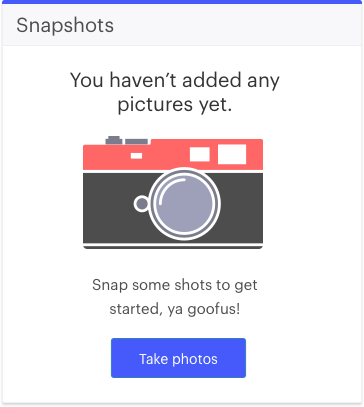
- If a page doesn't contain any data (but can), the action the user needs to take in order to populate the page should be made as clear as possible.
- The standard format for empty states is as follows:

Optionally an icon or illustration may accompany the empty state.
10.7 Headers and tabs
When a group of pages uses a tab set as secondary navigation, the amount of content included above the tabs should be minimal—usually just a title, a few primary actions, high-level information like project state, and back navigation if applicable.
10.9 Check boxes
Checkboxes should be used in instances during which a user can select multiple options. The selection of checkboxes should follow a consistent and predictable pattern.
- If there are layers of items to select from, practice progressive disclosure with check boxes in subsections
- If a user selects the checkbox for Section 1, the checkboxes for Section 1, Items 1-N will be revealed
- If a user selects some items within a section and then deselects Section 1, the check boxes for Section 1 will hide
- If user then reselects Section 1, the user’s previous selections will be remembered upon reveal of Section 1, Items 1-N checkboxes
10.11 Success and failure animations
When performing an operation on an element in a list, the item's background color should be animated green or red after the operation is complete in order to indiciate the success or failure of the operation.
- See example here: Projects documents and surveys tab
10.12 Z-Index
The site's z-index stack is structured as follows:
- Modal windows sit on top of all other elements.
- The top navigation bar sits on top of everything else.
- Popovers and tooltips should float over all other content except the top nav bar, but including the side navigation.